
Introduction
In SAML federations, the Service Provider application needs to find out where to send the end user for authentication. This is called discovery, there are two ways to achieve it, and doing both is recommended:
-
Use a discovery service such as OpenAthens Wayfinder
-
Support WAYFless URLs
The term “WAYFless” comes from the old Shibboleth term for discovery, Where Are You From. It is a method of avoiding the user having to explicitly state “where they are from” by supplying the federation identifier for the user's organization in the URL. For example, https://sp.example.com/path?entity=https://idp.them.example.com/entity.
A related technique is deep linking. Through deep linking, a user can go directly a specific page in your application and be authorized for access, without having to go to your home page to sign in. This enables library portals to maintain a list of links to individual articles.
WAYFless access and deep linking are very popular with our mutual customers and you should support both where possible.
Both are supported by Keystone and, when combined, make your application compatible with our redirector (a tool that allows the customer to put vanilla target links behind a consistent prefix and removes the need for proxy server masques in things like link resolvers).
Setting up WAYFless access
WAYFless access is supported with minimal configuration. The link is formed like this:
https://connect.openathens.net/YOUR_OPENATHENS_API_NAME/APPLICATION_ID/login?entity=CUSTOMERS_FEDERATION_ENTITY_ID
E.g: https://connect.openathens.net/example.com/1667g24k-2a82-4928-a72b-777dja6do9a2/login?entity=https://idp.generic_customer.edu/entity
(essentially replace the '.oidc-app-v1.' part of your application's client ID with a slash for that middle bit)
This is not the prettiest link to present to your customers. However, the deep linking step can help with that.
Configuring the service provider dashboard
In the application’s Configuration tab, you will need to add the URL of your OIDC handler page (i.e. where your OIDC login is configured) in the Login URL field, so that connect.openathens.net, knows where to send the user afterwards.
Setting up deep link support
This requires you to add a little bit of code to your website/application to accept a target parameter (or extract one from the URI), store it in a domain cookie while the user is sent to connect.openathens.net, and then use your cookie to send the user where they need to go when they are returned to you.
Pseudocode
// using a parameter at e.g. www.example.com/deeplink?entity={entity}&target={target}

    $target = $_GET['target'];
	$entity = $_GET['entity'];

	// set a target cookie
    $cookie_name = "deeplink";
    $cookie_value = "${target}";
    setcookie($cookie_name, $cookie_value, time() + (60 * 5), "/"); // Five minutes should be more than enough

	// Send the user to the WAYFless link
    header("Status: 302 Temporary move");
    header("Location: https://connect.openathens.net/YOUR_OPENATHENS_API_NAME/APPLICATION_ID/login?entity=${entity}");

	exit;

// after the user is returned to your OIDC handler page
// and at the appropriate place in your authorization flow

	// read the cookie
    $cookie_name = "deeplink";

    // Send the user to the page in the cookie, e.g:

    if(!isset($_COOKIE[$cookie_name])) {
        header("Location: ./DEFAULT_LANDING_PAGE");
    } else {
        header("Location: $_COOKIE[$cookie_name]");
    }
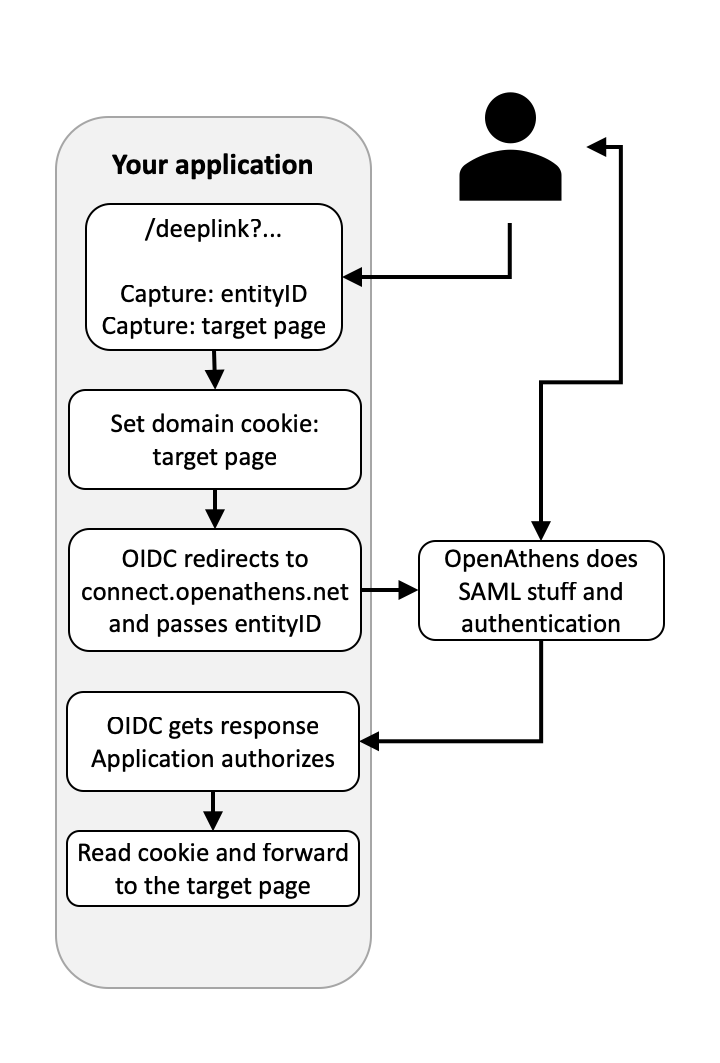
Configuring the Service Provider dashboard
You need to specify two things in the dashboard: a link syntax with a couple of variables, and, in a separate field, the internet domains you own that it applies to.
-
Access the Service Provider dashboard at https://sp.openathens.net.
-
Go to Applications and select your application.
-
On the Linking tab, add a tokenized application link and domain - you can use whatever parameter names you need to, but the tokens must be {entity} and {target}. E.g.:
-
Link syntax field (tokenized URL):
-
https://sp.example.com/deeplink?entityID={entity}&target={target}
-
-
Service domains field (internet domains where the link syntax above will work):
-
.example.com
-
-
-
If not already set, on the Configuration tab set the Login URL to be the URL of your OIDC handler page. This enables the WAYFless routing to work and is necessary.
-
Save your changes.
When specifying domains in the service domains field, the system will automatically wildcard them, so if you want to exclude any subdomains you will need to specify all the ones to include. e.g:
sub.example.com
img.example.com
Multiple domains can be specified if necessary, e.g.
.example.com
.example.net
The dot should be included in case your domain should happen to match the tail of someone else's domain - e.g. mine.com could clash with notmine.com whilst .mine.com would not.
You must not include domains that you do not own. They may be removed without notice.
Next step
Getting production ready with Keystone