
Format of redirector links
A redirector link includes a prefix - the same for each link - that provides information about your domain and how authentication is configured through OpenAthens. The redirector uses this information to route the user in the most appropriate way. While the redirector is not a proxy, in some library tools, such as catalogues, discovery services and link resolvers, it can take the place of a proxy prefix.
Redirector links look something like this:
https://go.openathens.net/redirector/mydomain.openathens.net?url=https%3A%2F%2Fjournals.acme.org%2Fgardening-monthly%2Fwhy-are-my-plants-turning-yellow.html
The link consists of:
-
The redirector prefix, which in this example is https://go.openathens.net/redirector/mydomain.openathens.net?url=. The prefix contains the name of your domain (here, ‘mydomain.openathens.net’)
-
The URL of the linked resource, which is passed as a parameter following ?url=. The URL is percent encoded to escape special characters such as slashes and colons. In this example, the normal URL of the linked page would be https://journals.acme.org/gardening-monthly/why-are-my-plants-turning-yellow.html
As you can see, this example link points to a specific article within a website. Using the redirector enables you to create deep links to content without requiring the user to find the required page again following authentication.
Redirection process
When a user follows a redirector link:
-
If the user’s request comes from an IP address that has been configured to bypass authentication (for example, a computer in a university library), the user is taken directly to the resource for IP authentication without needing to log in.
-
Otherwise, they need to authenticate through single sign-on. If the user already has an active OpenAthens session, they are taken to the requested URL without needing to log in again.
-
If they don’t have an active session, the user is taken to a login screen and asked to enter their single sign-on details. The user doesn’t need to specify the institution to which they belong, since the system knows this from the domain name embedded in the link. After they successfully authenticate, they are taken to the requested URL.
A redirector link is a type of WAYFless link in which the target URL itself does not need to be in WAYFless format.
Compatible resources
To fully support redirector links, and provide seamless access for both on-site and off-site users, a resource must have the redirectable status. This means that it allows WAYFless access and deep linking.
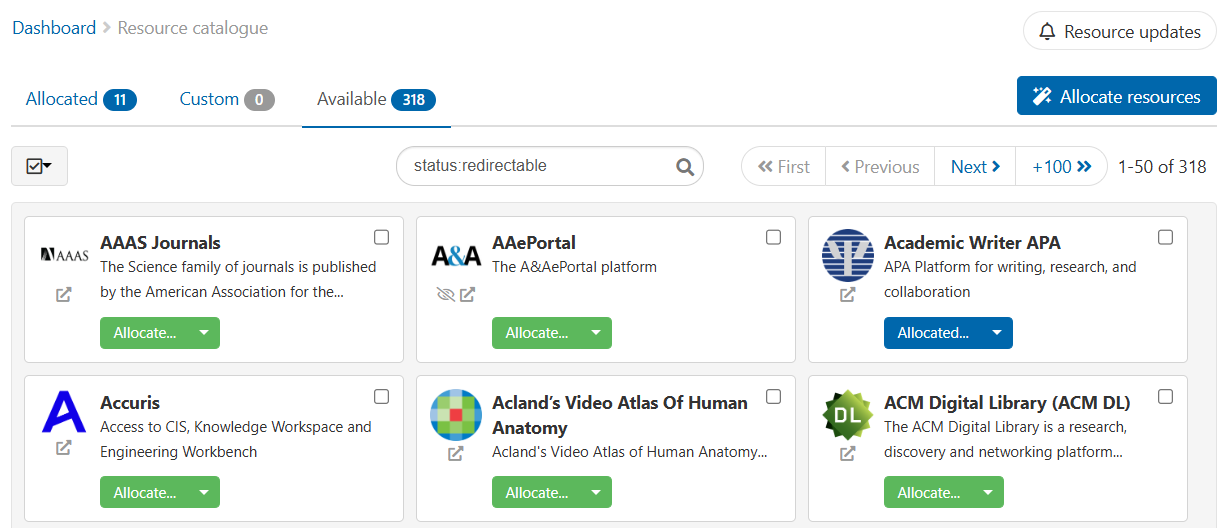
Redirectable resources are identified in the resource catalogue with a 
To view redirectable resources:
-
In your resource catalogue, find a resource with the
-
Alternatively, enter ‘status:redirectable’ in the search field
Bypassable resources
If a resource is not fully compatible with the redirector, it can still be bypassable. Bypassable resources allow users to bypass authenticating through single sign-on if they come from a permitted IP address (step 1 in the redirection process above).
To be bypassable, a resource must have an access URL. Most resources, unless marked with a 
Any resource that has the redirectable status is automatically bypassable as well.
If a resource is bypassable but not redirectable, you can’t create deep links to individual pages. You can link only to the main access URL for the resource, which is typically the home page.
To set up authentication bypass, see Redirector preferences.
Anything to watch out for?
-
As resources change over time, it may be necessary to change the authorisation method you use for access to a redirectable resource. For example, the provider of a resource that you access through a proxy might switch to federated access. In such a situation, our service desk will update you
-
Redirector links work at the domain level
-
If both federated and proxied versions of a resource exist, the redirector gives priority to the federated version