
Path to function: Management > Connections > Add > ADFS
OpenAthens can connect to ADFS (Active Directory Federation Services) so that you do not have to issue personal accounts for your users. (You will still need your OpenAthens administrator account.)
As well as the ability to use local accounts instead of maintaining a separate set of credentials, accesses to federated resources that already involve discovery (identifying the user’s home organisation) will take the user directly to your ADFS login.
Preparation
You will need:
-
Windows Server 2008R2 or better running ADFS v2.0 or above
-
A member of your IT team to configure ADFS and supply the metadata
-
Ideally, an externally accessible URL for your ADFS metadata. Failing that, a copy of the metadata as an XML file
-
All users to be in your directory
-
Access to the OpenAthens administration area at the domain level
If you are migrating from an alternative IdP such as Shibboleth, see also Migrating from your own IdP.
For technical issues, you may need help from your IT team. Our support team will try to help as far as possible, but can support only the OpenAthens end of the connection.
Add the connection in OpenAthens
-
Log in to the OpenAthens admin area as the domain administrator.
-
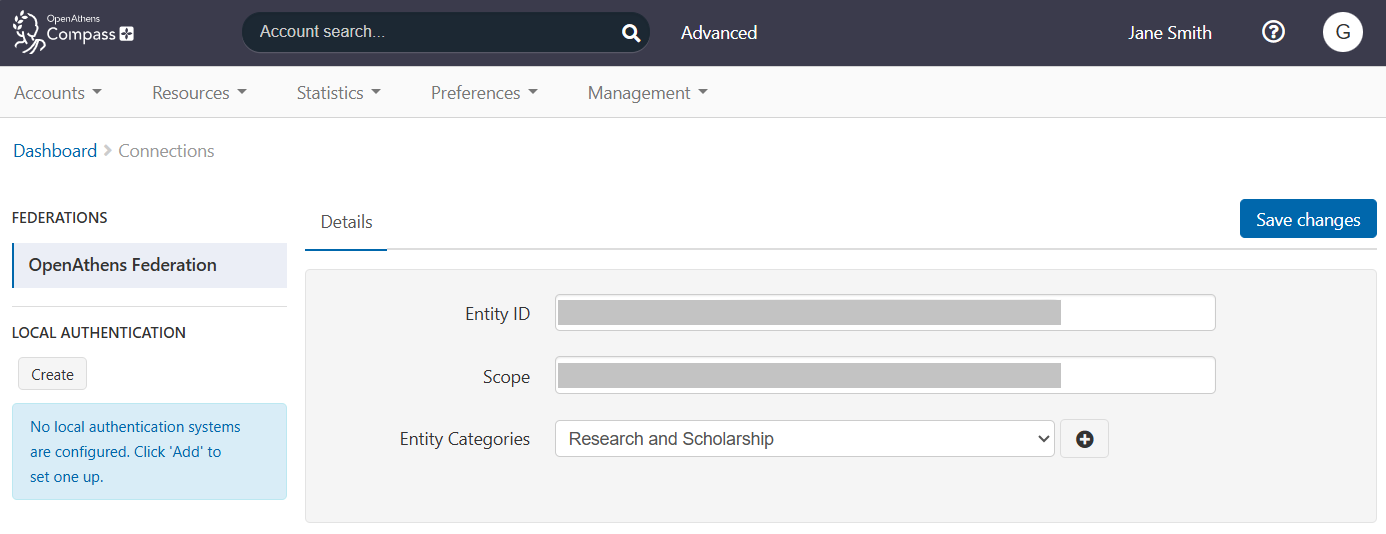
Go to Management > Connections.
-
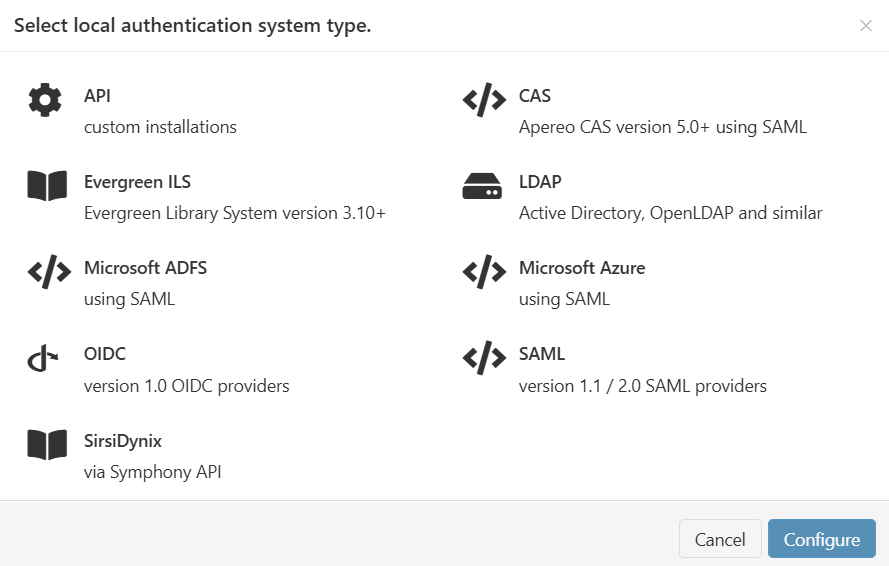
Under Local authentication in the left sidebar, press Create. A pop-up opens, showing available types of connector.
-
Select Microsoft ADFS and press Configure.
-
Either:
-
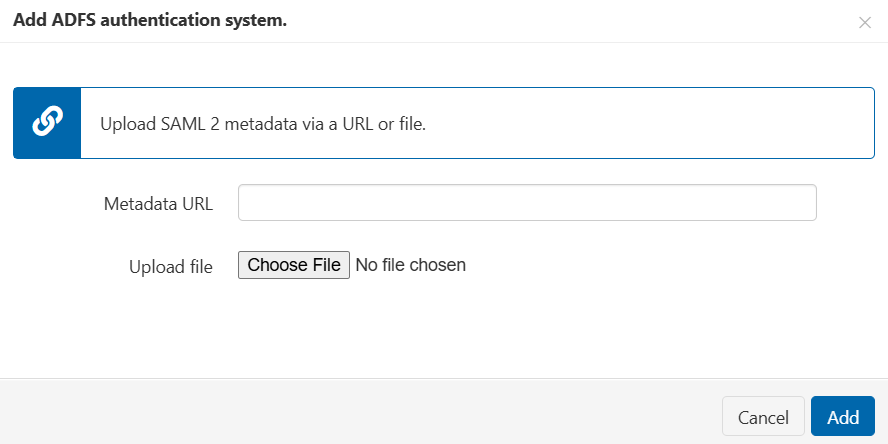
Enter the URL of the ADFS metadata in the Metadata URL field. The metadata URL is typically something like
https://YOURDOMAIN/FederationMetadata/2007-06/FederationMetadata.xml. The URL needs to be accessible outside your network. -
Click Choose File and upload an XML file of ADFS metadata supplied by your IT team.
-
-
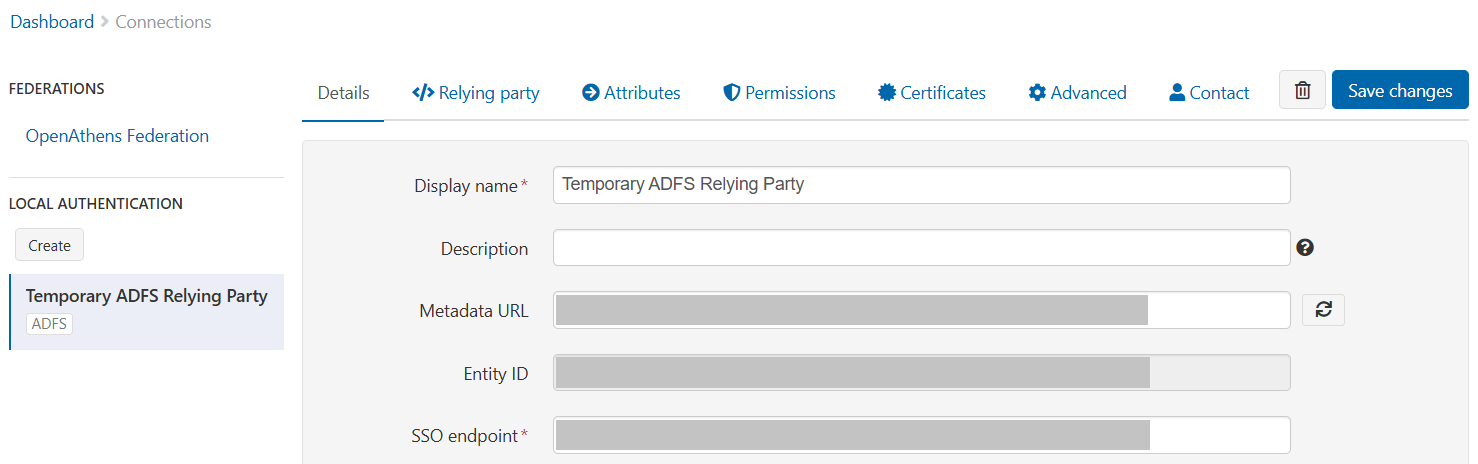
Press Add. The connector is created. You can now view or edit its details.
-
Fill in the Details tab as follows:
|
Field |
Explanation |
|---|---|
|
Display name |
The name of the connection as it will appear in our authentication point when there is a choice of connector. Defaults to the name specified in the ADFS metadata. |
|
Description |
The description of the connection as it will appear in our authentication point when there is a choice of connector. |
|
Metadata URL |
Where the ADFS metadata is published. Populated only when metadata is loaded from a URL, this setting allows easy updates to the connection if your ADFS system changes. |
|
EntityID |
The entity identifier of your ADFS instance, typically |
|
SSO endpoint |
The login address, typically |
|
Display name attribute |
The claim you specify here supplies the value displayed in account lists and audits trails where you would normally see the OpenAthens username. DisplayName is a common source but it does not have to be different from the Unique user attribute claim. |
|
Unique user attribute |
The claim you specify here must supply a value unique to the user within the current user set and should supply a pseudonymous value unique to that user for all time. This is used by the system to tell users apart and also used in the generation of targetedIDs and statistics. It does not have to be the username entered at your login point. ObjectGUID is a popular choice. Advanced: If using the SAML NameID here, the requirement for unique and persistent limits the type to:
|
|
Status |
Not Live = connection can be used only in debug mode. If the Live status is turned off, the Visible and Default settings are ignored. The connection will not be available through the standard authentication point, although it is not disabled completely. Live and Visible (if this is the only local connection) = connection can be used only in debug mode. Live and Visible (if there are multiple live and visible connections) = users are offered a choice of connections, including this one. There is a domain preference to include OpenAthens accounts or not. Live and Visible and Default = this connection is your only login option and users will be sent directly to your login whenever the organisation is known. A successful authentication tells the authentication point to remember that location. A failed authentication clears the location preference. Debug mode will not show other login options. Changes to the status usually take effect within moments. |
|
Create local accounts |
Automatically: any user authenticated by your system and passed back to us is deemed OK and will be accepted by the system. Manually: only user IDs you have previously uploaded via the list page will be accepted by our systems. Unlisted users will be denied access and you will see organisation mapping errors in the reports interface. |
|
Remove local accounts |
This setting controls when local account data will be automatically cleared from the system and is the number of days from the last time the account last signed in. Pre-mapped accounts that have not been seen are also cleared. The setting can be from 1 to 365 days and represents the number of complete days that have passed since the date the account last signed in, i.e. does not include the day of the last sign-in in the count. See also: How to modify a local account.
|
|
Salt value |
The salt used to generate a targetedID for users authenticated by this connection. You might edit the salt if upgrading from Shibboleth, so that your users can have the same targetedID value when they change systems. If you set it to blank, the connection will use the same salt as your OpenAthens accounts. Avoid modifying this setting after you go live, which will change the identifiers seen by service providers for your users. |
-
Save your changes.
-
Lastly, go to the </> Relying party tab and copy the Metadata URL displayed there. You will need this when you add OpenAthens to ADFS.

Add OpenAthens as a relying party in ADFS
The following section assumes you are familiar with ADFS, If you are not, the next three steps have an alternative, more detailed guide available. See also the Microsoft ADFS documentation. We recommend consulting your IT team if necessary.
-
In your ADFS management console, add a new relying party trust using the OpenAthens metadata address you copied earlier.
-
Edit claim rules to release at least a user identifier attribute.
-
A simple 'Send LDAP Attributes as Claims' rule is sufficient.
-
The claim value must be unique amongst current users. Ideally, it should be pseudonymous and remain unique forever. Something like objectGUID is a good choice.
-
Naming considerations:
-
If you are unfamiliar with the ADFS name space, or want to provide more meaningful names for the interface your colleagues will see, you may like to prefix the claim names with something such as 'oa_', e.g. 'oa_username', to avoid accidentally using reserved terms.
-
Claim names may not contain spaces.
-
-
-
Save your changes.
Depending on your library's needs, this may be sufficient. However you will usually want to release more information so that claims can be mapped to OpenAthens attributes and used for organisation, statistics, resource access, display names and resource allocation. For example:
-
First and last names to help identify users
-
Email address to help the library contact users and, in certain cases, release that data to service providers
-
An attribute such as memberOf, so that different groups of users can be assigned different permission sets based on rules
-
An attribute to serve as a display name
-
A department or OU name for aggregation of statistics
In all cases, the library will need the name of the claim for the next part of the setup. Claim names are case sensitive.
Example Issuance transform rule:
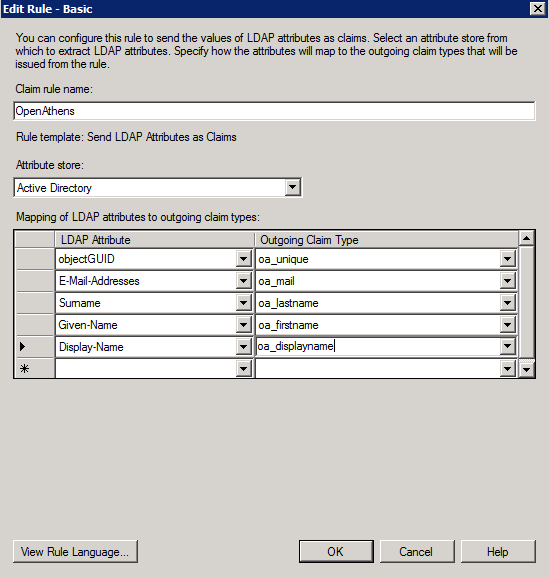
AD will truncate sAMAccountName before release if it is over 20 characters. This may affect your choice of unique user attribute.
Configure mappings and permission sets
The final two areas to configure are permission set rules and attribute mappings:
-
Permission set rules to assign your users an appropriate set of resources
-
Attribute mappings so that OpenAthens can make use of data available from your directory
-
OpenAthens will cache these attributes when the user signs in, so changes in ActiveDirectory won't be picked up until the next time the user starts an OpenAthens session.
-
When you're ready to go live, set the Status of the connection to both Live and Visible. Save your changes. Your new connection should be ready for testing within seconds.
How to test
Discovery is not available until you set the connection as Live and Visible, so that users do not get offered options that are not ready to be used. To test your connection before going live, you will need to use debug mode to make the connection selectable by you.
Once you have tested and are happy, you can set the connection as Live, Visible and optionally Default (where available), then save. This will make it live for your users within a few seconds.
Multiple connectors and OpenAthens accounts
This type of connector is best used as the default connection. In this mode, when a user arrives at our authentication point with your organisation known, such as would happen if they select it at a resource's login, use a WAYFless URL, use the Redirector or have previously authenticated successfully, they are passed directly to your login without seeing our authentication point.
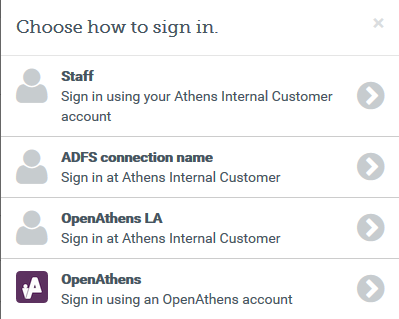
If you need to use multiple connections, or OpenAthens accounts alongside local accounts - e.g. if you have a group of users that are not in your directory - then you can set the connection as Live and Visible but not Default, and set it to allow OpenAthens accounts via the setting on the domain preference page. In this mode, when the user arrives at the authentication point with your organisation known, they can select the connection they want to choose from all Live and Visible local connections as well as OpenAthens accounts. The authentication point remembers their choice for next time.
Multi-valued attributes
With multi-valued attributes, such as the memberOf field in ADFS, the interface is unable to display all values and will display only one. However, all values are read and cached, so are available for functions like permission set rules and attribute release.
Other tabs
Certificates
In the Certificates tab, you can add a second certificate. This is useful if you need to change a server certificate on AD and want to minimise downtime for your users.
Advanced
The Advanced tab includes several settings that are seldom necessary to change:
-
Switch between SAML versions, if you have a source that can handle only the older SAML 1 profile
-
Switch the profile from Redirect to Post if your source insists on it
-
Enable signing of authentication requests (SHA-1 or SHA-256) if your source requires it
-
Enable the SAML
forceAuthnoption (forces your local source to re-authenticate any time the user is sent there - e.g. where users can have multiple affiliations within a consortium and your SAML source's session management makes it difficult for them to change)
Anything to watch out for?
When you use the refresh metadata button 
If for any reason you have locked your ADFS system down to use TLS versions earlier than 1.2, OpenAthens will reject the connection.
Pseudonymous?
We recommend using pseudonymous identifiers for the unique user attribute in order to avoid potential problems with data protection legislation, since that identifier lives on for a time in the audit trail after other mapped attributes are cleared.